Your phone system
just learned to think|
NeuraPBX is an enterprise IP PBX built on FreeSWITCH with AI woven into every call — receptionist, copilot, biometrics, translation, and CRM sync. Run it on OpenAI's cloud or 100% locally with Ollama + faster-whisper.
one-click toggle
carrier-grade
option
PLAYS NICE WITH YOUR HARDWARE & STACK
Everything a PBX should do.
Nothing you have to babysit.
Carrier-grade FreeSWITCH routing under the hood, a clean dashboard on top. The full enterprise feature set, dynamically compiled — no XML hand-editing, ever.
Advanced Call Routing
SIP trunks, DID inbound routes, least-cost outbound with failover, time conditions with holiday calendars, day/night overrides, CID-based VIP routing, blacklists, DISA, Follow Me with press-1 confirm, and per-extension E911.
Extensions & Voicemail
Bulk creation, per-extension recording & DND, PIN-protected boxes with web playback, group mailboxes, and AI voicemail-to-email.
Call Queues (ACD)
Four ring strategies, skill-based agent tiers, position announcements, custom hold music, and a live wallboard.
Supervisor Tools
Spy, whisper, and barge from the Monitoring page or *33. BLF-style Operator Panel with one-click transfer.
Conferences & Parking
Meet-Me rooms with moderator PINs, parking slots with ring-back, paging & intercom groups, scheduled bells.
Zero-Touch Provisioning
Yealink, Grandstream, Polycom, Snom, Cisco & Fanvil auto-configure from a MAC address — BLF keys included.
My Portal
Every employee gets self-service: visual voicemail, DND, personal Follow Me, speed dials, and call history.
Enterprise Administration
Nightly backups, HMAC-signed webhooks, API tokens, audit logging, Prometheus metrics, CSV bulk import/export, CDR billing with rate tables, fail2ban, recording consent, and T.38 fax-to-email.
Eighteen AI features.
One toggle each. Zero restarts.
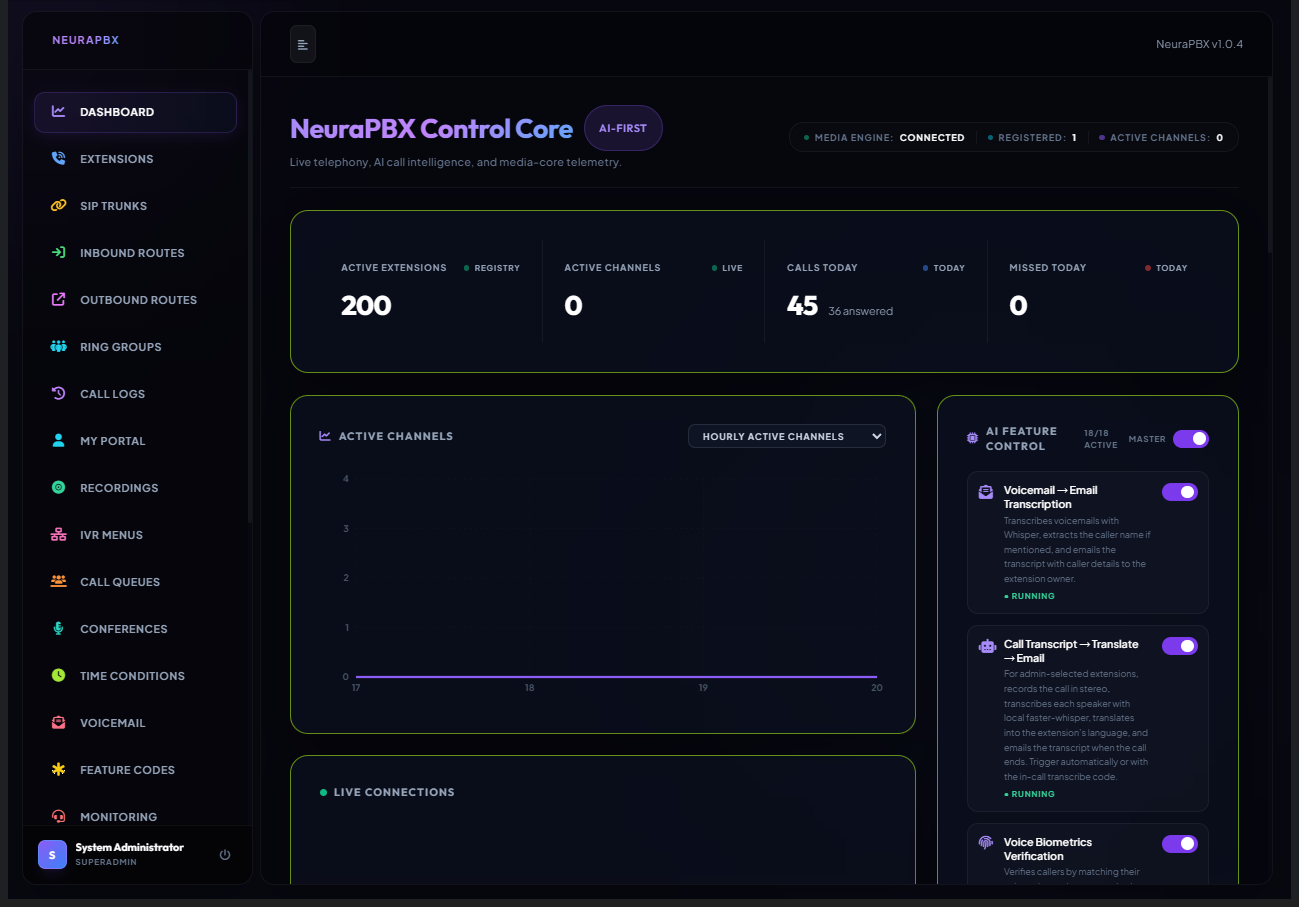
Flip them on from the dashboard's AI Feature Control — five of them are shown below. Run on OpenAI's cloud, or keep every byte of audio on your own hardware with Ollama + faster-whisper. Features still being built are marked Preview here and in the dashboard, with the exact limitation spelled out.
An AI receptionist that actually listens
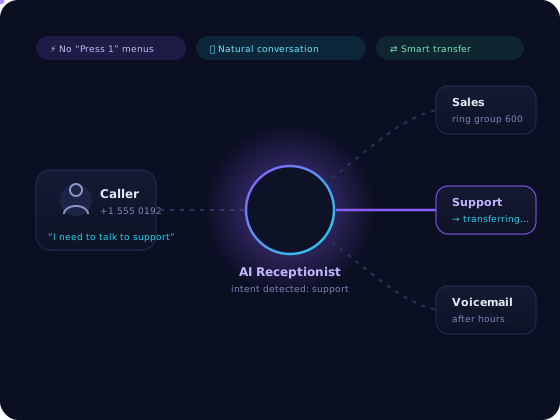
No more "Press 1 for Sales." Callers just talk. The AI answers questions, detects intent, and transfers to the right human the moment it hears "talk to support."
- Natural conversation, customizable system prompt
- Seamless handoff to extensions, queues & ring groups
- Hours-aware — pair with time conditions for night mode
Every call becomes structured data
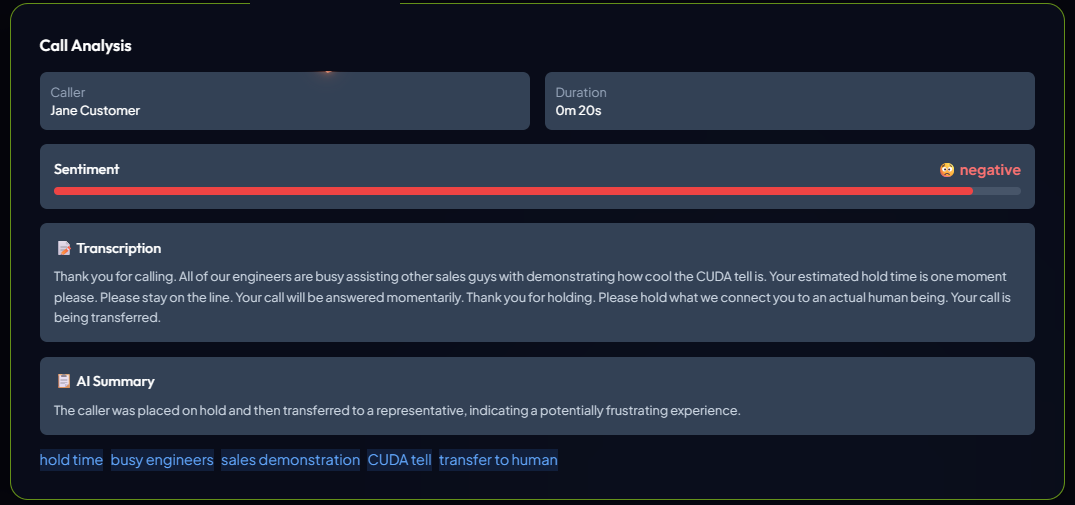
Whisper transcribes each recording — in the cloud or fully on-prem. The AI extracts summaries, keywords, action items, and sentiment, then pushes it all to your CRM automatically.
- Cloud or local: OpenAI, or Ollama + faster-whisper
- Summaries, tags & action items on every call
- Webhook push to HubSpot, Salesforce, Zoho or your own endpoint
Voicemail → Email
Whisper transcribes new voicemails, the AI pulls out the caller's name, and the transcript lands in the owner's inbox.
Agent Copilot
Live transcription during calls with suggested answers, KB articles, and draft emails popped straight onto the dashboard.
Voice Biometrics Preview
Callers matched against stored voice prints entirely on your own hardware, with a voice_verified variable your dialplan can route on.
Matching works, but there is no replay or voice-clone detection — use it as one signal, never as sole proof of identity.
Translation Bridge Preview
The caller's speech is transcribed, translated and spoken to the agent, and the agent's replies spoken back to the caller.
Consecutive, not simultaneous — each side hears the translation a few seconds after the other stops speaking.
CRM Sync
Transcript, summary, and action items POSTed to a webhook after every call — wire it to HubSpot, Salesforce or Zoho directly or through Zapier/Make. No manual entry.
Your calls. Your hardware.
Nobody else's AI.
Flip the provider to local (Dashboard → System → AI Models) and the entire AI stack runs inside your network. No third-party AI provider ever sees your audio, transcripts, or caller data — and your core AI features stop costing tokens entirely.
- Transcription stays home — faster-whisper runs on your own hardware; call audio never leaves your network
- Every LLM task runs on your Ollama instance — summaries, sentiment, action items, copilot, and voicemail-to-email, all processed locally
- Your knowledge base never leaves the box — company docs are stored and searched on your own server to ground Copilot's answers
in local mode
sent to AI clouds
inside your firewall
A license you can budget.
AI included.
Predictable annual PBX licensing by extensions & trunks — with an AI bundle included for every user, no per-seat add-on required. Or a one-time, fully offline perpetual license. Start free, forever.
Free
- 5 extensions
- Core PBX: calls, voicemail, IVR, ring groups
- 1 SIP trunk + all AI features — 30-day trial, unmetered
- Community support
Starter
- 25 extensions · 2 SIP trunks
- Everything in Free
- AI Essentials included — all users, unmetered
- Queues & conferences
- Parking & time conditions
Business
- 100 extensions · 8 SIP trunks
- Everything in Starter
- AI Ultimate included — every AI feature, all users
- Provisioning & operator panel
- Monitoring, My Portal & reports
Enterprise
- 500 extensions · unlimited trunks
- Everything in Business
- AI Ultimate included — every AI feature, all users
- Multi-tenant & HA
- API, webhooks, audit · priority support
Add-on packs: +25 extensions $99/yr · +2 trunks $59/yr
AI is included every paid plan · no per-seat fee · no usage charges
There is no separate AI subscription to buy and no AI usage metering of any kind. Run the models locally on your own hardware, or point them at OpenAI with your own API key — either way the inference is yours, and NeuraPBX never bills a minute.
*Preview — both work, with limits worth knowing. Translation is consecutive rather than simultaneous, so each side hears the other a few seconds later. Voice biometrics matches voices but has no replay or clone detection, so treat it as one signal rather than proof of identity. Every Preview feature states its exact limitation in the dashboard. See what each AI feature does today →
Cloud AI uses your own OpenAI API key, so OpenAI bills you directly at their rates and NeuraPBX adds nothing on top. Local AI — faster-whisper and Ollama on your own hardware — costs nothing at all.
Own it forever. One machine, one payment.
One-time on-prem licenses — no subscription, no AI. The full core PBX feature set, installed with zero internet and cryptographically locked to one machine's MAC address.
Micro
- 8 extensions · 2 SIP trunks
- Full core PBX — no AI
- Perpetual · offline · machine-locked
Small
- 32 extensions · 4 SIP trunks
- Full core PBX — no AI
- Perpetual · offline · machine-locked
Medium
- 64 extensions · 8 SIP trunks
- Full core PBX — no AI
- Perpetual · offline · machine-locked
Large
- 128 extensions · 16 SIP trunks
- Full core PBX — no AI
- Perpetual · offline · machine-locked
X-Large
- 256 extensions · 32 SIP trunks
- Full core PBX — no AI
- Perpetual · offline · machine-locked
Add-ons apply to a package on the same machine · up to 64 SIP trunks & 512 extensions max.
Perpetual license terms: A one-time purchase of the version available at the time of purchase, licensed to a single machine (bound to its Machine ID) and covering the core PBX only — no AI features. No recurring fees, and no guarantee of future updates, upgrades, new features, or included support. The software is provided “as is,” without warranty of any kind. Moving the license to new hardware or obtaining version upgrades may be arranged separately. Summary only — full Terms apply.
Questions, answered.
Can NeuraPBX run fully on-premise?
Yes — that's the point. It runs entirely on your hardware or VMs, deployed via Windows/Linux install scripts or the pre-configured Docker stack. With local AI enabled, even transcription never leaves your network.
Do the AI features require OpenAI?
No. Bring your own OpenAI key, or run everything locally: Ollama (Gemma, Llama, Qwen…) for language tasks and faster-whisper for transcription. Providers switch live from the dashboard — no restart.
How do I toggle individual AI features?
From the Dashboard's AI Feature Control widget. All six features toggle independently and apply instantly.
How does licensing work?
You register a cryptographically signed license.key fingerprinted to your host machine. The free tier needs no license at all.
What phones and softphones are supported?
The native NeuraPBX Windows softphone, the browser web phone, any standard SIP client (Zoiper, MicroSIP), and auto-provisioned desk phones from Yealink, Grandstream, Polycom, Snom, Cisco, and Fanvil.
Give your PBX a brain.
Deploy NeuraPBX in your environment, or talk to us about custom features. We'll get back to you within one business day.